

How to automate AP accruals: steps, rules, and software
Automate AP accrual schedules, reviews, posting, and reversals.
Accrual automation helps accounts payable (AP) teams find incurred expenses that have not yet been recorded and prepare supported entries for review. Automated accruals use purchase orders (POs) and receipt records to recognize those expenses in the correct period.
When that information is spread across reports and spreadsheets, AP has to reconstruct the company’s outstanding obligations every month. AP accrual automation connects purchasing and receipt data continuously, applies calculation rules, and prepares entries for review. A more complete accrual package reaches accounting sooner as a result.
What is accrual automation?
Accrual automation uses software to collect evidence of incurred expenses and calculate proposed entries under company policy. It connects purchasing records with accounting review, so teams can prepare supported accruals throughout the period.
Accrual accounting is the method of recognizing revenue and expenses when they are earned or incurred. Accrual automation is the tooling used to prepare and manage the entries that apply that method.
What does AP own in the accrual process?
AP usually owns the transaction-level information needed to identify expenses that belong in the current accounting period. The exact responsibilities vary by company, but AP often prepares the accrual schedule that accounting reviews and posts.
Depending on the available data, AP may handle goods received not invoiced (GRNI), contract-based accruals, travel and expense (T&E) accruals, and corporate card accruals.
For PO-backed purchases, AP compares open POs with goods receipts or service confirmations. A received item that has not been invoiced may require an accrual, depending on the company’s materiality policy and accounting rules.
AP may also reconcile vendor statements to find outstanding balances that were not invoiced before the cutoff. Corporate card and T&E activity can enter the same review when charges have been incurred but have not reached the general ledger.
The final output is a supported accrual schedule. It shows the vendor, PO, amount, accounting period, and basis for each estimate. That ownership makes accrual management an AP concern as well as an accounting one.
Where does the manual AP accrual process break?
Manual accrual processes depend on AP finding and interpreting incomplete transactions under a tight deadline. Four problems come up most often.
- Open PO aging requires manual analysis. An open PO report does not show what was delivered during the period. AP has to compare PO dates with receipt records and decide which balances still represent valid commitments.
- Three-way matching starts too late. Three-way matching compares the PO, receipt, and invoice after an invoice arrives. If goods or services were received without an invoice, there is nothing to match, so AP has to estimate the obligation from purchasing and receipt data.
- Missing information turns into a follow-up campaign. AP emails vendors to ask whether work was completed and requesters to ask whether items arrived. Some answers come in after accounting needs to close the period, and some never come in at all.
- Reversals require separate tracking. When an invoice posts in the following period, someone has to find the related accrual and reverse it. A missed or incorrect reversal can leave expenses or liabilities overstated.
Common types of accruals AP teams handle
The calculation depends on the evidence available and the expense incurred by the cutoff. Coverage varies by platform, so confirm which of these types a tool supports before you rely on it.
Payroll accruals usually sit outside AP and rely on payroll records.
Accrued vs. prepaid expenses
An accrued expense records a cost already incurred before payment or invoicing. A prepaid expense starts as an asset because the company paid before receiving the full benefit. It then becomes an expense as that benefit is consumed.
How does AP accrual automation work?
Accounts payable accrual automation connects activity across the purchasing process, so AP does not have to rebuild the same picture at every close. Most systems follow five steps.
1. Capture receipts continuously
When a goods receipt or service confirmation is recorded, the system associates it with the matching PO line. If the invoice has not arrived, the line is marked as received but not invoiced.
AP gets a running view of potential accruals instead of pulling a new report at month-end.
2. Apply accrual rules
The system calculates a proposed accrual according to company policy. A fully received PO line may be accrued at its remaining uninvoiced value. A partial receipt may generate a proportional accrual.
Here is an example. A $30,000 engagement runs 90 days, and services are delivered evenly. The engagement begins in the final month of the closing period, and 10 days of service have been delivered by the cutoff. Nothing has been invoiced or recorded. The proposed accrual is $30,000 ÷ 90 × 10 = $3,333.33.
After approval, the period-end journal entry is a debit to professional services expense of $3,333.33 and a credit to accrued liabilities of $3,333.33. If company policy calls for a day-one reversal, the next period’s entry is a debit to accrued liabilities of $3,333.33 and a credit to professional services expense of $3,333.33.
If the invoice is still missing at the next close, the obligation is reassessed, and the remaining unrecorded amount is accrued. When services are not delivered evenly, milestone or completion evidence is the better basis for the estimate.
3. Assemble the accrual package
At the close date, the system prepares a draft schedule for AP. Each proposed entry can include the supplier, PO number, amount, accounting period, and supporting receipt information. AP reviews exceptions and estimates instead of building the schedule line by line.
Lines without adequate support still need an answer from someone. In Zip, an agent asks the PO owner or vendor directly and uses the response to build the estimate, so AP is not the one sending reminder emails.
4. Approve and post entries
Once AP or the controller approves the schedule, entries move to the enterprise resource planning (ERP) system through an integration or an approved export.
Approval records and supporting documents should stay attached to the transaction. That creates a traceable record for internal reviews and Sarbanes-Oxley Act (SOX) controls.
5. Reverse the accrual
When the supplier invoice arrives and matches the underlying PO and receipt, the related accrual is identified for reversal. Accounting records the actual invoice expense without leaving the estimate on the books.
When the invoice differs from the estimate, accounting compares the actual charge with the accrued amount and investigates the variance. In the example above, suppose a $3,500 invoice arrives for the same service period. Reversing the $3,333.33 estimate and recording the $3,500 invoice captures the $166.67 difference. Finance then decides whether the variance is a change in estimate or an error that needs correction under its accounting policy.
What to look for in accrual automation software
When you evaluate accrual automation software, ask vendors to show how their software calculates, approves, posts, and reverses accruals. Test each of these with a representative transaction from your own books.
- Source data. The software connects POs, receipts, and contracts, and it flags missing inputs or changes before calculating an accrual.
- Calculation rules. Calculation methods and materiality thresholds can be set by expense type, with controls for canceled or unfulfilled purchases.
- Supporting records. Each proposed entry carries its source records and calculation rationale, so a reviewer can reproduce the amount.
- Approvals. Entries route to the right accounting owner, and approval is recorded before posting.
- ERP posting. The legal entity, general ledger account, and cost center carry into the ERP. Rejected entries are handled in a defined way.
- Reversals. The vendor can show whether reversals are scheduled automatically or require a separate action, and how the software keeps an accrual and its invoice from recording the same expense twice.
- Audit history. Source data, rule changes, and approvals are retained for SOX controls and audit review.
How does accrual automation work with your accounting software or ERP?
AP teams need to know where an approved entry lands and which system remains the accounting system of record.
Zip’s accounting solution lists integrations with NetSuite, Oracle Fusion, SAP S/4HANA, Sage Intacct, and Workday Financial Management. Zip’s integration ecosystem also includes application programming interface (API) endpoints for custom integrations.
Approved accruals reach the ERP in one of two ways. Direct posting sends the entry into the accounting system through an integration. An ERP-ready export produces a journal file for controlled import.
Whichever route you use, confirm three things before implementation:
- the required posting dimensions for your ERP
- whether reversals are scheduled in the accrual tool or in the ERP
- that approvals and supporting records stay available for audit review
What does automation give AP teams back?
The immediate benefit is time. The system assembles the initial schedule, so AP spends close week validating unusual transactions and incomplete records.
Automation also improves completeness by checking receipt and invoice status across the full PO population. Items are less likely to disappear because someone overlooked a row in an aging report.
AP also gets visibility before close. A continuously updated view of received but uninvoiced activity helps the team estimate the accrual liability during the month. For a broader look at connected invoice processing, see Zip’s guide to AP automation software.
Zip’s accounting solution page reports 66% faster time to month-end close and 41% higher team productivity. Those figures are benchmarks for the broader accounting solution, not measured results from accrual automation alone.
Betterment uses Zip’s accrual exports to surface open commitments, including invoices received but not yet processed. The customer story also describes how coding set at purchase approval reduces the details AP has to chase after an invoice arrives.
How does accrual automation fit into Zip’s procurement process?
Accrual quality depends on the information captured before an invoice reaches AP. Zip connects accrual activity with the same intake-to-pay process that creates the purchase request, routes approvals, issues the PO, and records receipt information.
Because the purchasing data is already structured, AP does not need to request a separate procurement report and reconcile it against another system. The accrual can draw on the approved PO, supplier details, receipt status, and supporting documents already attached to the transaction.
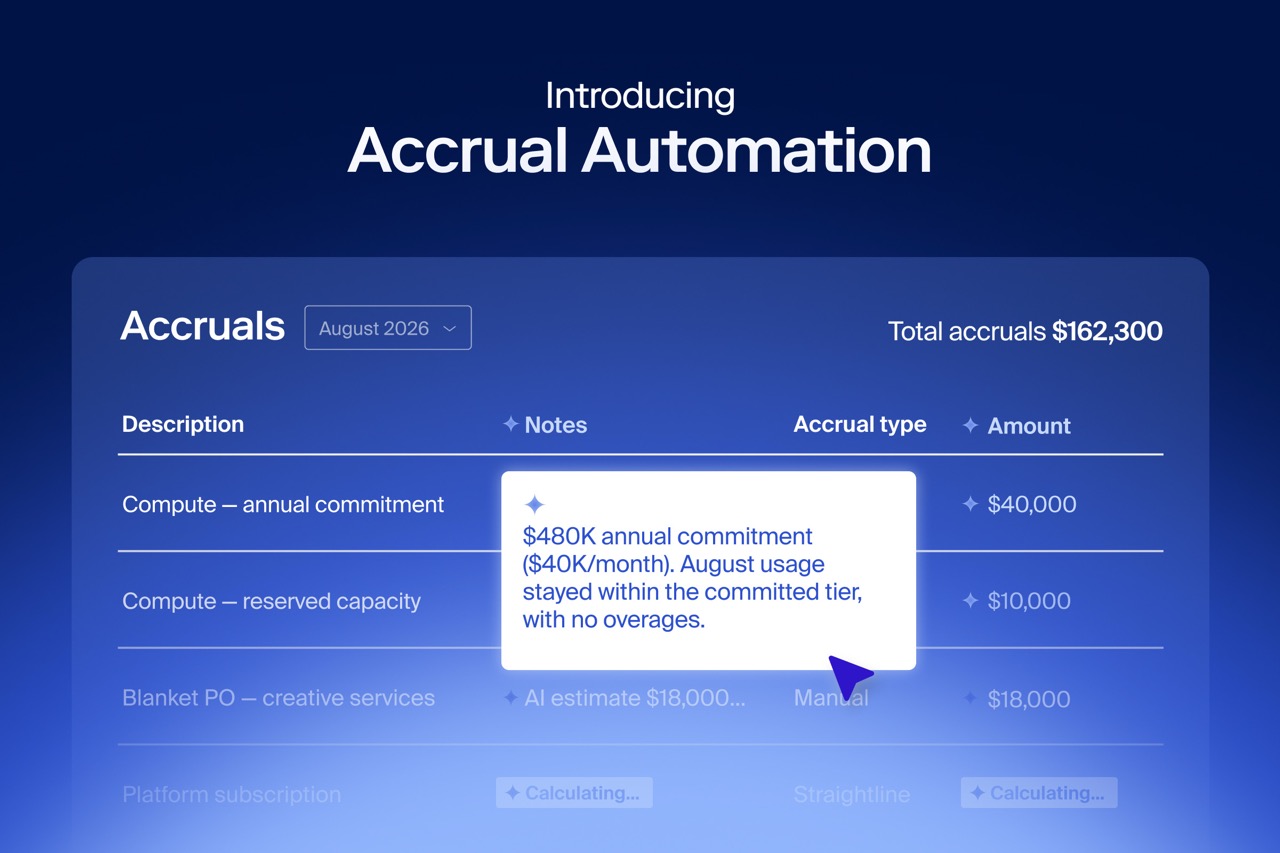
Zip’s accrual automation builds each accrual from the PO, receipt, and invoice data already in the platform. It covers PO-backed accruals and non-PO bills, and every line carries its source record and approvals.
That upstream context is what separates procurement-native accrual automation from tools that start with the invoice or the ledger. A ledger-only tool cannot tell an unbilled delivery from a canceled order. With purchasing data in the same platform, AP can identify obligations before the invoice arrives.
Automate AP accruals with Zip
A reliable AP accrual process identifies uninvoiced obligations throughout the month and prepares them for a controlled close. Zip connects procurement and AP data, so teams can review a supported accrual package, resolve exceptions, and send approved entries to the ERP.
These resources go deeper:
- How Zip’s accrual automation works covers the product.
- The accrual automation guide covers the accounting mechanics.
- The accounting solution page shows how purchasing context supports the close.
- If you are comparing invoice processing tools, the AP automation software guide is a good place to start.
Request a demo to see how Zip can support a more continuous month-end close.
Frequently asked questions
What is the difference between an AP accrual and a standard journal entry?
An AP accrual records an expense and the related liability before the supplier invoice is posted. A journal entry is the accounting mechanism used to record that accrual or any other adjustment in the general ledger.
How do AP accruals work with three-way matching?
Three-way matching validates an invoice against a PO and receipt. AP accruals cover the earlier period, after goods or services arrive and before the invoice does. Once the invoice arrives, matching confirms the actual amount and starts the accrual reversal.
At what dollar threshold should AP automate accruals?
There is no universal threshold. The right amount depends on the company’s materiality policy, transaction volume, and close controls. Automation is most useful when AP has to evaluate a large population of open POs, even if only some items exceed the posting threshold. PO-backed spend is usually the best place to start because it has the cleanest source data.
How does AP accrual automation handle partial receipts?
The system calculates the accrual from the quantity or value received rather than the full PO amount. For service-based purchases, it may apply a percentage or time-based rule that reflects work completed during the period.














AI procurement orchestration, from intake to pay
Enter your business email to keep reading
